
A powerful standalone malware scanner that works across all platforms — WordPress, Joomla, Drupal, Magento, vBulletin, and any custom PHP website. No account registration or advanced IT knowledge required.
This version of Website Antivirus works across all platforms — WordPress, Drupal, Joomla 1.0 and above, Magento, vBulletin, PrestaShop, OpenCart, and any custom-built PHP website. It supports Apache, NGINX, and Windows web servers, making it one of the most versatile website malware scanners available. No account registration or advanced IT knowledge is required to use it.
Installation takes just one click. Simply download the Website Antivirus Installer, upload it to your website via FTP or your hosting panel's File Manager, and use your browser to scan and analyze the entire website. Our proprietary heuristic scanning engine will detect known and unknown malware, backdoors, webshells, injected JavaScript, obfuscated malicious code, and other threats that standard scanners miss.
The standalone antivirus is a single PHP file — no database, no complex setup, no dependencies. Upload it, run it in your browser, and get comprehensive scan results within minutes. Perfect for emergency security checks and quick malware detection on any web server.
This standalone tool is ideal for website owners, developers, and system administrators who need to perform immediate security scans without installing a full CMS extension. It's also an excellent first step for websites that suspect they may be compromised — providing a fast, reliable assessment of your server's file integrity and overall security posture.
Follow these four simple steps to scan your website for malware, backdoors, and security vulnerabilities. The entire process takes less than 2 minutes.
Download the Website Antivirus Installer file — click here to download. This is a single PHP file that contains the complete scanning engine.
readme.txt file inside the ZIP archive for detailed Windows-specific instructions.
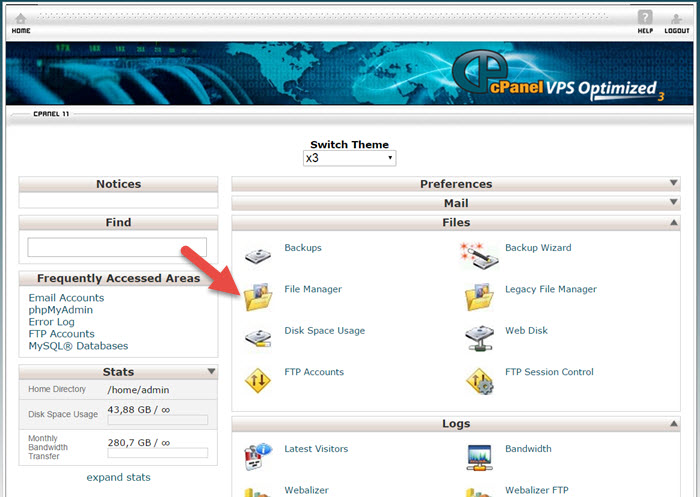
Use any FTP client you prefer (e.g., FileZilla, WinSCP, Cyberduck) and upload the file antivirus_scanner.php into the root folder of your website. On most servers, this is the /public_html folder.
antivirus_scanner.php directly into the root folder of your website.
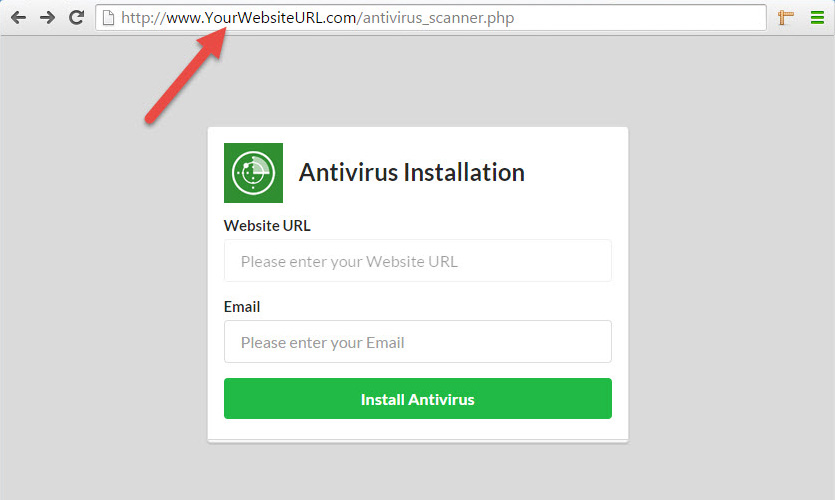
Open your browser (Chrome, Firefox, Safari, or any other) and type the following URL in the address bar:
http://www.YourWebsiteURL.com/antivirus_scanner.php
Replace www.YourWebsiteURL.com with your actual website URL. You will see the antivirus installer form. Fill in the required fields and click the "Install Antivirus" button to proceed.
Follow the on-screen instructions, click the "Scan" button, and wait for the results. The antivirus will analyze all files on your server, checking for malware signatures, suspicious code patterns, backdoors, webshells, and file integrity issues.
Once the scan is complete, you'll receive a detailed report listing any threats found, their severity levels, and the exact file paths — giving you full visibility into your website's security status.
Our standalone antivirus combines the power of a professional-grade security scanner with the simplicity of a one-click installation process.
Works on every CMS and platform — WordPress, Joomla, Drupal, Magento, vBulletin, PrestaShop, OpenCart, and any custom PHP site. Supports Apache, NGINX, and Windows servers.
No account registration, no complex configuration, no dependencies. Upload a single PHP file, open it in your browser, and start scanning immediately — the entire process takes under 2 minutes.
Our proprietary engine goes beyond signature-based scanning — detecting unknown malware, zero-day threats, heavily obfuscated backdoors, and suspicious code patterns that standard tools miss entirely.
Our scanning engine analyzes every file on your server to identify a wide range of security threats and malicious code patterns.
Detects known malware signatures, trojans, and virus code injected into PHP, JavaScript, HTML, and system files on your server.
Identifies PHP backdoors, webshell scripts, and hidden access points that attackers use to maintain persistent unauthorized access to your server.
Detects heavily obfuscated and encoded malicious scripts designed to evade standard security scanners — using pattern analysis and code behavior evaluation.
Identifies unauthorized file changes, suspicious newly created files, and modified core CMS files — helping you detect intrusions and unauthorized code injections.
Common questions about the standalone Website Antivirus, its installation, and how it compares to our full security packages.
The standalone Website Antivirus Installer is available for download. It allows you to perform comprehensive server-side scans of your website files to detect malware, backdoors, and other threats. For ongoing protection and monitoring, consider our full Website Security packages.
No. If you can upload a file via FTP or your hosting panel's File Manager, you can install and run the antivirus. The entire process requires just 4 simple steps — download, upload, open in browser, and click scan. No command line access or programming skills needed.
The antivirus works on all major web server environments including Apache, NGINX, LiteSpeed, and Windows IIS. It's compatible with shared hosting, VPS, and dedicated servers. Any hosting that supports PHP will work with our scanner.
The standalone version is platform-independent and doesn't integrate into your CMS admin panel. It's ideal for quick one-time scans and emergency checks. Our CMS-specific antivirus extensions (for WordPress, Joomla, Magento, etc.) integrate directly into your admin panel, providing continuous monitoring, automatic updates, and a dashboard for ongoing security management.
As a security best practice, we recommend removing the scanner file from your server after completing your scan. For continuous, automated security monitoring, consider upgrading to our full Website Security package which includes 24/7 scanning, file change monitoring, malware removal, and expert incident response.
If the scan detects malware on your website, we strongly recommend contacting our security team immediately. Our experts can perform thorough malware removal, identify the attack vector, clean all infected files, and harden your website against future attacks. You can reach us through our Contact page or sign up for our Website Security package.
Download the standalone Website Antivirus, upload it to your server, and get a comprehensive security report in minutes. No registration required.