WordPress Plugin

SiteGuarding SpeedUp for WordPress: Page Cache

SiteGuarding SpeedUp keeps a ready copy of every page of your website and gives it to visitors without running WordPress for each visit. Pages open faster, the server does less work, and the website stays fast during traffic peaks. The free SiteGuarding SpeedUp plugin brings the cache into your WordPress admin: you see that it works, clear it when you need to, and WordPress keeps it fresh by itself every time you change content.

Last Update: 11 Oct 2026
Version: 1.0.0
Compatibility: WordPress 4.6 or later, PHP 5.6 or later
Price: Free
License: GPLv2 or later

How it works

SpeedUp is the page cache of the SiteGuarding firewall. It answers before WordPress starts, so a cached page costs the server almost nothing.

1. You add the website to your SiteGuarding dashboard and turn on SpeedUp under Website Performance. The dashboard sets up the firewall and the cache on the server.

2. The first visitor of a page gets it from WordPress as usual, and SpeedUp saves a copy. The next visitors get the copy in a few milliseconds.

3. The plugin tells SpeedUp what to forget. When you edit a post, the plugin clears that post and the lists it appears in. When you change the theme, menus or settings, it clears everything.

4. Personal pages are never shared: logged-in users, carts and checkout always get a fresh page from WordPress.

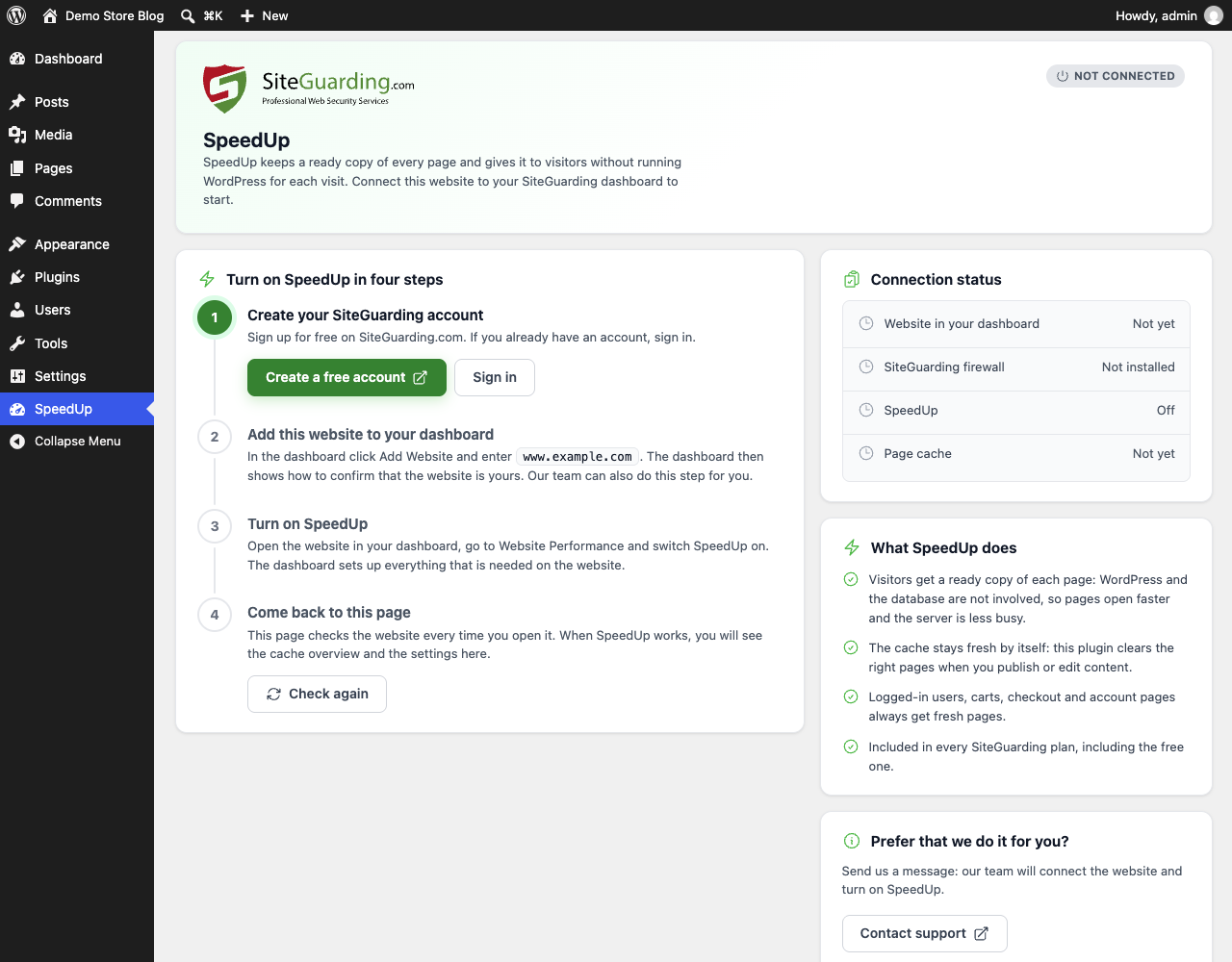
The plugin itself installs nothing on the website. If SpeedUp is not set up yet, the plugin shows a short guide with four steps and a link to your dashboard. SpeedUp is free on all SiteGuarding plans, including the free one.

Main features

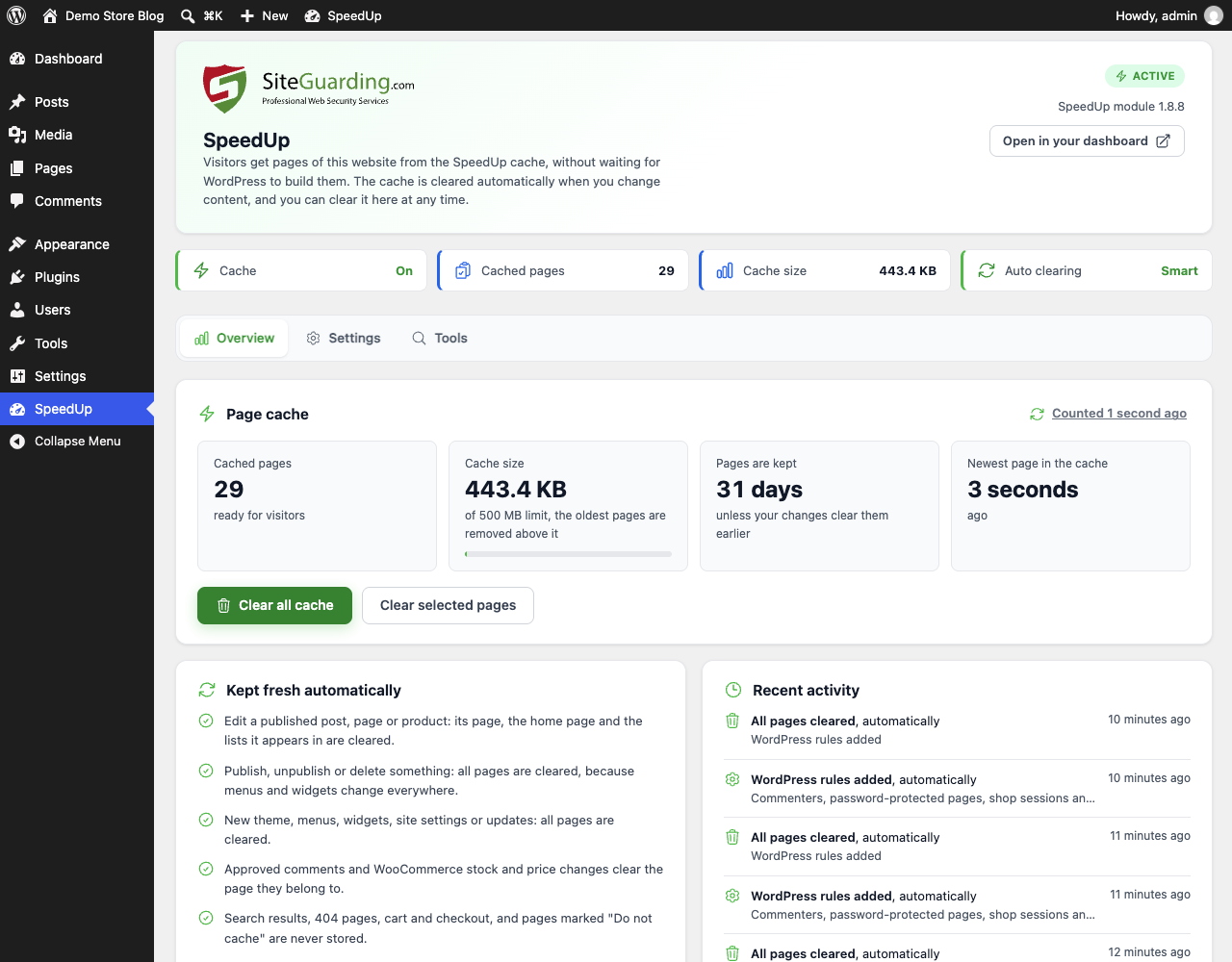
  • Status at a glance: is the cache on, how many pages are cached, how much space they take and when the newest page was saved.
  • Automatic clearing: editing a post, page or product clears its page, the home page, the blog page, its categories, tags, author and date archives. Publishing, deleting, changing the theme, menus, widgets or settings, and installing updates clear everything.
  • Your choice of clearing: only what changed (recommended), or all pages on every change for themes that show posts in places WordPress does not report.
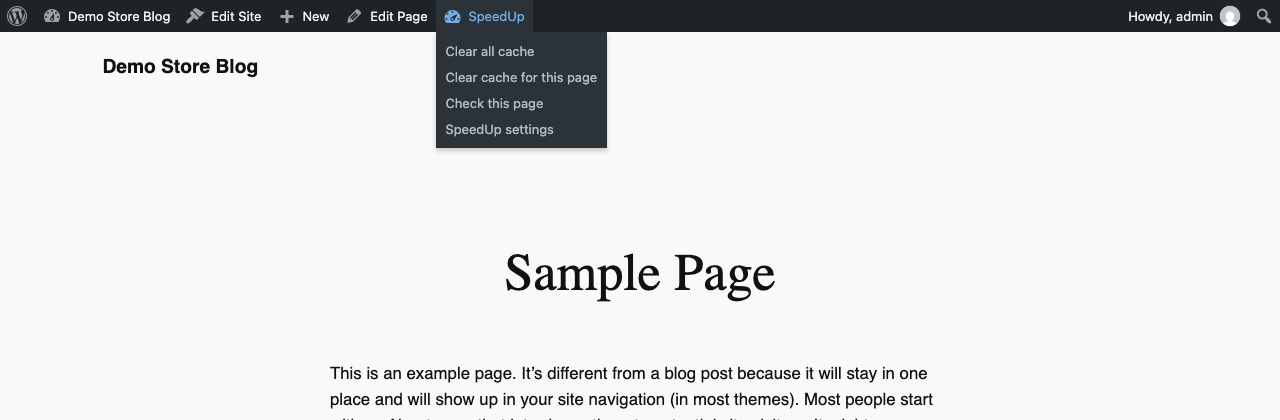
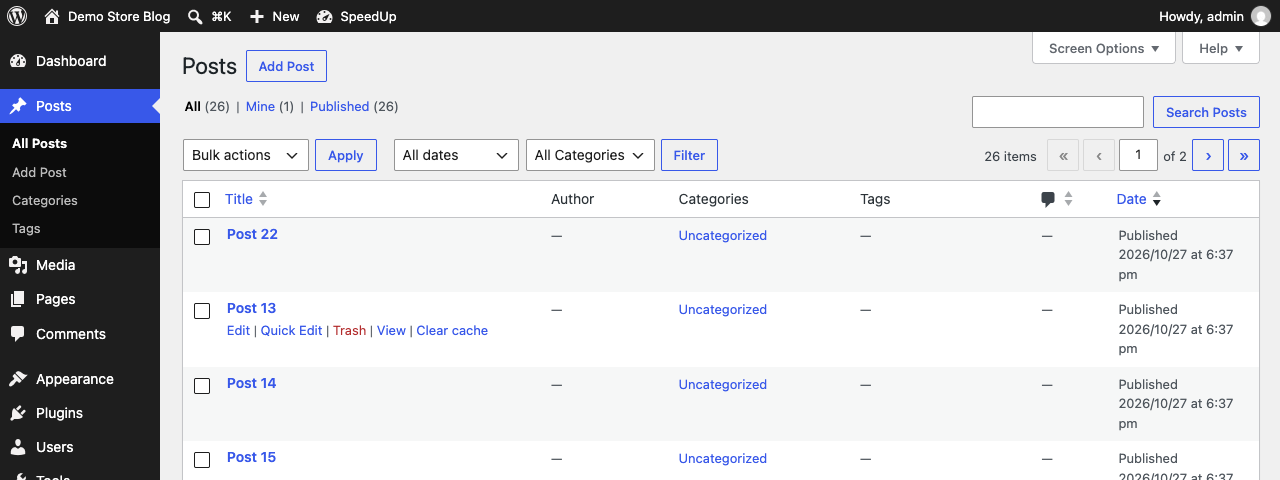
  • Clear in one click: the whole cache or a list of addresses, from the plugin screen, from the toolbar on any page, or with the "Clear cache" link in the list of posts.
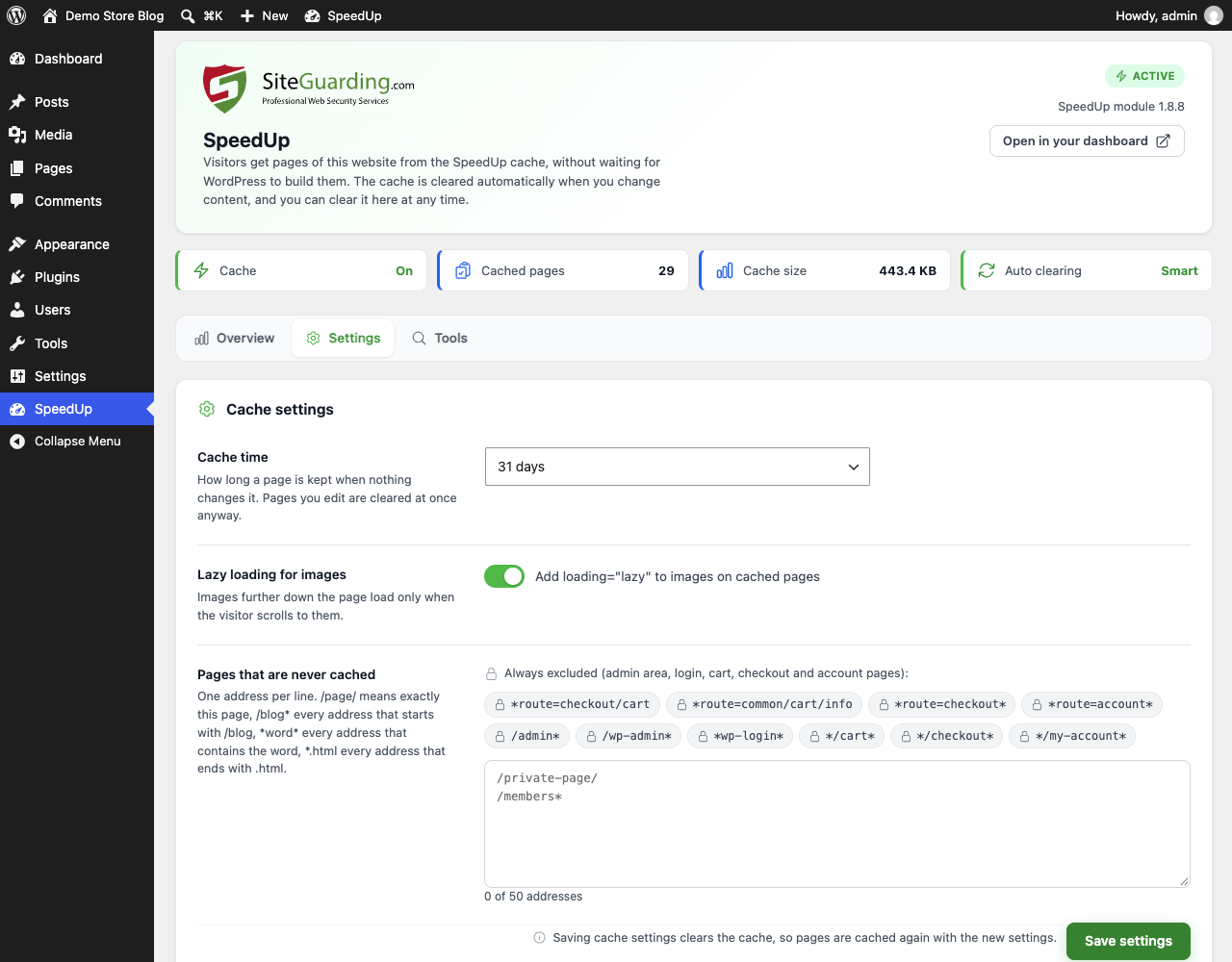
  • Cache settings, the same as in your SiteGuarding dashboard: how long a page is kept (1 hour to 31 days), lazy loading for images and the pages that are never cached.
  • Personal pages stay out of the cache: logged-in users, commenters, password-protected pages, WooCommerce cart and checkout, search results and 404 pages.
  • "Do not cache this page" box in the post and page editor.
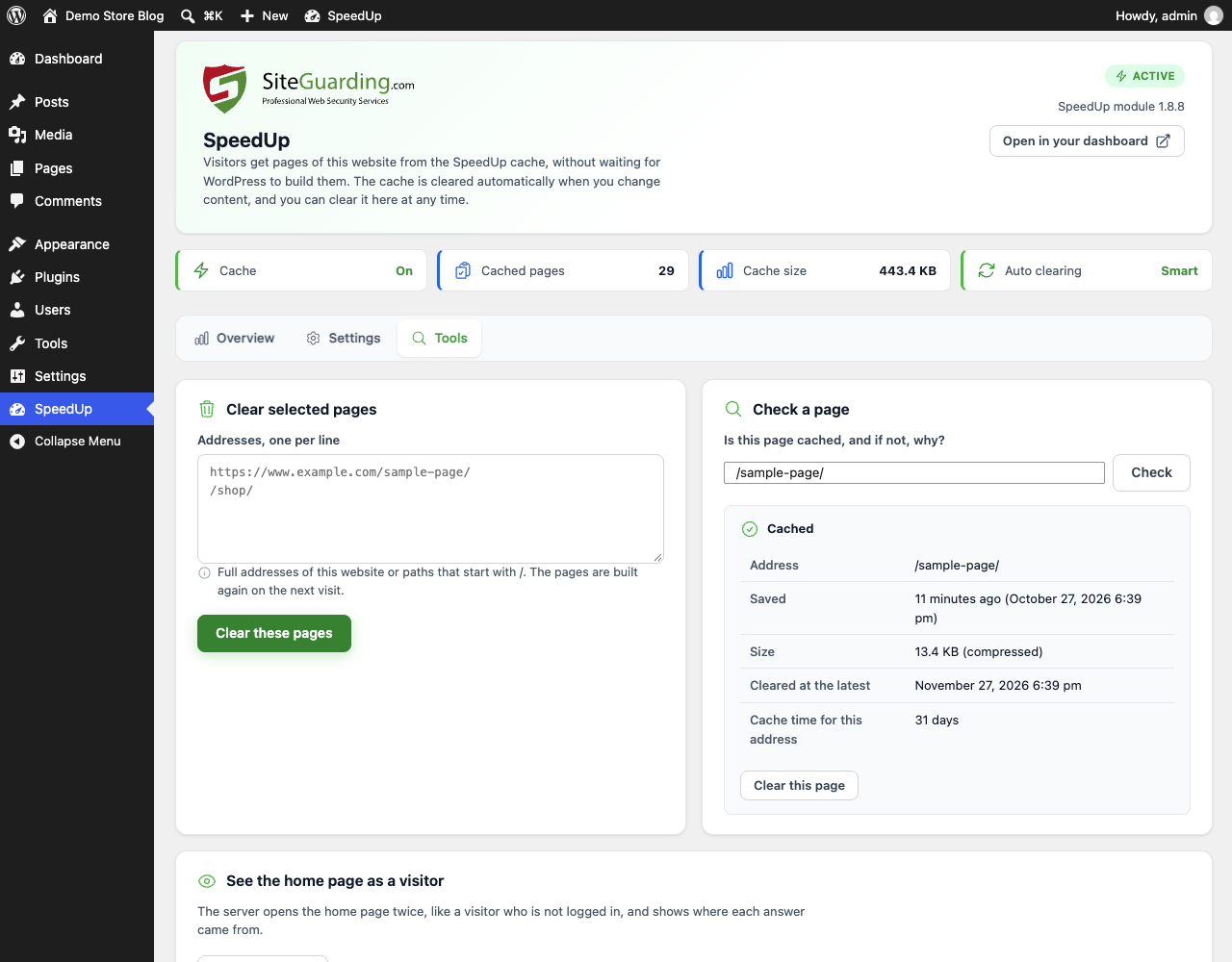
  • Page check: enter an address and see whether it is cached, since when, and if not, why.
  • Visitor check: the server opens the home page twice as a visitor and shows where each answer came from and how fast it was.
  • Settings history: the last 5 versions of the settings are kept, and you can go back to any of them.
  • Diagnostics with a "Copy for support" button, so our team can help you faster.
  • Warnings about another page cache plugin and about the old Speedup Optimization plugin, which the new plugin turns off safely.
  • Updates from siteguarding.com in the usual WordPress way.

WordPress specifics

  • WooCommerce: when stock or stock status changes, also after an order, the product page is refreshed. Shoppers with a cart get fresh pages.
  • Page builders: saving in Elementor and clearing the cache of Elementor, Autoptimize or Beaver Builder also clears SpeedUp.
  • For developers: do_action( 'sgsu_purge_all' ), do_action( 'sgsu_purge_url', $url ) and do_action( 'sgsu_purge_post', $post_id ).
  • WordPress Multisite is not supported yet: on a network the plugin tells you so and does nothing.

Screenshots

Requirements

WordPress 4.6 or later (tested up to 7.1), PHP 5.6 or later.

A free or paid SiteGuarding account with the website added to the dashboard and SpeedUp turned on under Website Performance. Our support team can do this for you.

Installation

1. Download the plugin ZIP file from this page.

2. In WordPress go to Plugins, Add New, Upload Plugin, choose the file and click Install Now, then Activate.

3. Open SiteGuarding SpeedUp in the admin menu. If SpeedUp is already on, you will see the overview. If not, follow the four steps on the screen.

What's new in 1.0.0

SiteGuarding SpeedUp 1.0.0 is a new plugin that replaces Speedup Optimization.

New screen with Overview, Settings and Tools.

Smarter automatic clearing: only the pages that changed, instead of the whole cache.

Clearing from the toolbar and from the list of posts.

Page check, visitor check, settings history and diagnostics.

Safe switch from the old Speedup Optimization plugin.

FAQ

Is the plugin free?

Yes. The plugin is free, and SpeedUp is included in every SiteGuarding plan, including the free one.

Do I need a SiteGuarding account?

Yes. SpeedUp is part of the SiteGuarding service. Sign up for free at siteguarding.com, add the website to your dashboard and turn on SpeedUp under Website Performance. Our support team can also do it for you.

Will my visitors see old content?

No. The plugin clears the changed pages as soon as you save. You can also clear any page or the whole cache by hand.

What happens when I deactivate or delete the plugin?

SpeedUp keeps caching pages, but WordPress no longer clears them when you change content. The SpeedUp files and settings are not touched. To stop the cache, turn SpeedUp off in your SiteGuarding dashboard.

Can I use it together with another cache plugin?

We do not recommend two page caches on one website. The plugin warns you when it finds another page cache plugin.

Download

Version 1.0.0 | Free | WordPress 4.6 or later | PHP 5.6 or later | License: GPLv2 or later

Live Chat Support
Our website uses cookies, which help us to improve our site and enables us to deliver the best possible service and customer experience. See our policy Accept